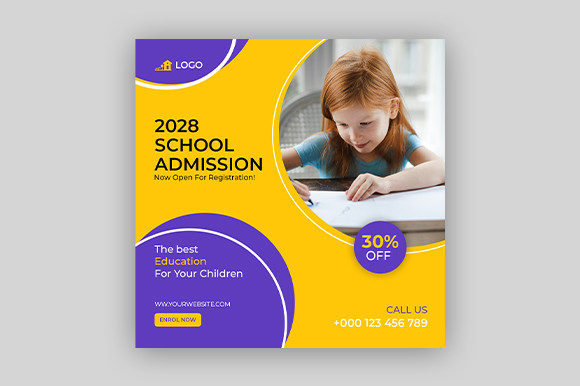
School Admission Social Media Post: Your Visual Shortcut to Enrollment Success
When parents scroll through Instagram or pause mid-feed on Facebook, they don’t stop for dense paragraphs—they pause for clarity, warmth, and confidence. That’s where a well-designed School Admission Social Media Post steps in: not just another graphic, but a strategic, eye-catching visual tool that turns passive scrollers into engaged families.
Think of it as your school’s first handshake—digital, polished, and purpose-built. It’s a ready-to-use, square-format (1080×1080 pixels) design template—fully editable in Illustrator—that communicates key admission details at a glance: deadlines, age ranges, open house dates, contact info, or even a warm “We’re Enrolling Now!” message. No design degree required. Just basic Photoshop or Illustrator know-how—and a clear idea of what you want families to see and do next.
Where This Template Fits Real Life—Not Just Theory
This isn’t a one-size-fits-all stock image. Its strength lies in how naturally it adapts to real moments schools live through—every single year.
A preschool director in Austin uses it to announce summer enrollment with playful fonts and soft pastel accents—paired with a photo of kids building blocks. A high school admissions officer in Chicago drops in their IB program highlights and application timeline, swapping out icons and adjusting text color to match school branding. A music academy in Portland layers in instrument silhouettes and “Auditions Open” messaging—then posts it across Instagram Stories and Facebook Events.
It works because it’s built for context—not just aesthetics. Whether you're promoting:
- Back-to-school registration for a charter elementary school,
- Graduation open houses for a private college prep academy,
- Summer camp sign-ups for a nature-based learning center,
- Art class waitlists for a community studio serving ages 4–14,
- Dance studio auditions for a competitive youth troupe,
- Kids’ birthday party packages offered by an enrichment center—
…this template holds space for your voice, your calendar, and your audience’s priorities—all without starting from scratch.
Who Benefits—and How They Use It Differently
Administrators, marketing coordinators, PTA volunteers, and even solo educators all find different value in the same file.
School office staff appreciate how quickly they can generate consistent posts across platforms—no waiting for a designer or wrestling with Canva templates that won’t export cleanly. One AI file means one source of truth; update the headline once, and it’s ready for every channel.
Private tutors and enrichment instructors use it to signal credibility. A clean, professional banner beside a post about “New Piano Class Starting September” tells parents this is structured, intentional, and worth their trust—even if it’s a home-based business.
Nonprofit education programs lean on its flexibility to highlight equity-focused messaging: “Scholarships Available,” “No Application Fee,” or “Bilingual Support Provided.” The editable layers make it easy to emphasize inclusion—not as an afterthought, but as part of the visual hierarchy.
And for multi-campus districts, the template becomes a brand anchor. Swap the logo, adjust colors to match each campus palette, and keep tone and structure unified—so whether it’s the Eastside Elementary or Westwood High, families recognize consistency, reliability, and care.
What to Consider Before You Customize
Before opening that AI file, ask yourself three quick questions:
- What’s the single action I want families to take? (e.g., click a link, call the office, attend an info session). Keep that goal front and center—don’t crowd the design with secondary asks.
- Who’s actually seeing this? Parents of toddlers scan differently than high school juniors researching dual-enrollment options. A preschool post might lead with smiling faces and simple phrases (“Ages 3–5 • Small Classes • Outdoor Learning”). A university recruitment post may highlight outcomes (“92% Placement Rate • Internship Partnerships”). Match language—and visual weight—to your audience’s mindset.
- Where will this live? If it’s going into Instagram Stories, leave breathing room at the top and bottom (safe zones)—text shouldn’t get cut off. For Facebook feed posts, bold headlines and high-contrast text ensure readability on mobile. The 72 DPI, RGB-ready format is optimized for screens—not print—so resist the urge to scale it up for flyers or banners.
Strengths That Make It Stick—and One Honest Limitation
Its biggest advantage? Speed without sacrifice. You’re not trading professionalism for convenience. The organized layers, intuitive naming, and smart spacing mean you spend minutes—not hours—updating content. And because it’s built in Illustrator (with EPS fallback), scaling stays crisp, colors stay true, and exports are platform-ready.
It also avoids visual fatigue. Unlike generic templates flooded with clipart or overused stock photos, this design leaves room for your authentic imagery—your actual students, your real classrooms, your genuine energy. The template doesn’t shout; it frames.
That said, it’s intentionally *not* a full branding suite. It doesn’t include custom fonts, logo files, or photo assets—because those belong to *you*. The zip folder gives you exactly what you need to act fast: one JPG preview, one AI file for deep edits, and one EPS for compatibility. That’s by design. It keeps things light, focused, and yours to own.
More Than Just a Banner—It’s a Moment of Connection
In education, timing matters. So does tone. So does trust. A School Admission Social Media Post bridges all three—not by replacing personal outreach, but by making your first impression intentional, inclusive, and instantly understandable.
Whether you’re launching a new after-school robotics club or welcoming transfer students mid-semester, this template meets you where you are: pressed for time, committed to clarity, and deeply invested in who walks through your doors next.
It doesn’t promise enrollment—but it removes one friction point between interest and action. And in a world where attention is scarce and decisions are emotional, that kind of thoughtful simplicity? That’s where real impact begins.